As mentioned before, I use Emacs, org-roam and org-journal. In total I have about 3000 org-files and a tiny fraction of them contains org-keywords. Those files I would like to have in my org-agenda-files (so that they show up in my org-agenda). If there is no TODO or any other org-keyword left, these files should be automatically removed.
This is what I came up with: My solution uses rg (ripgrep) and directly modifies “org-agenda-files”. Put the snippet below in your .emacs, adjust your org-keyword and whenever you save a buffer, “agenda_files.el” is updated. rg is really fast and this causes no tangible delay in my setup.
(defun lt/auto-add-org-agenda ()
  "Automatically add org-files to org-agenda-files or remove them, based on whether or not they contain org-keywords."
  (interactive)
  (with-temp-file org-agenda-files (insert (shell-command-to-string (concat "rg --sort modified -e '\\*.(TODO|NEXT|WAITING|RECREATION|PROJECT).[^%]' -g \"*.org\" -l " org-directory)))))
  (add-hook 'org-agenda-mode-hook 'lt/auto-add-org-agenda)
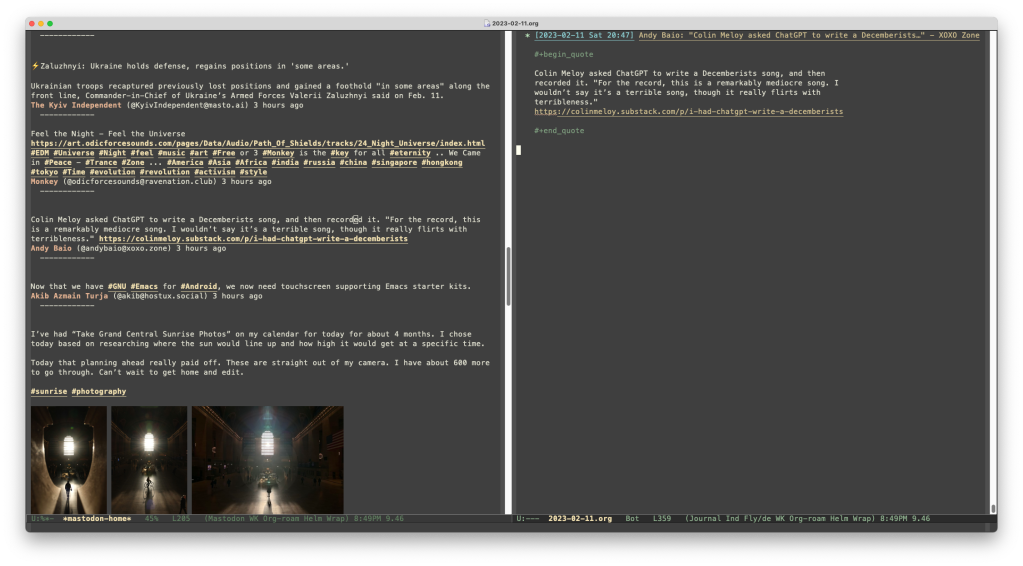
(On the left is the orginal toot, on the right is the “org-ified” version pasted into org-journal.)
There is a lot of useful information flying around in Mastodon. Some of it I would like to archive in my text-based database (i.e. org-roam). To access Mastodon inside Emacs I use mastodon.el. This little hack copies an org-ified version of the “toot” at point in the mastodon.el timeline to the clipboard. It uses the URL of said toot to pull it’s title from the web (via org-web-tools) and creates an org-link as the heading/context for the toot. The content of the toot is then pasted between #+begin_quote and #+end_quote. I also added a keybinding (“j”) for this to work inside mastodon.el.
Caveats: For boosted toots you need to focus on the original toot first (via “T”). Line breaks are still a bit of a mess.
Update 2023_02_04: I played around with this setup and decided to directly paste the toot into an org-journal entry. The following code will add that functionality to the keybinding “J” (when in Mastodon.el).
(defun lt/mastodon-toot--copy-orgified-toot-to-org-journal ()
          "Copy org-ified toot at point to org-journal."
            (interactive)
            (lt/mastodon-toot--copy-orgified-toot-to-clipboard)
            (org-journal-new-entry nil)
            (org-yank))
 (define-key mastodon-mode-map (kbd "J") 'lt/mastodon-toot--copy-orgified-toot-to-org-journal)
Btw: If you replace (org-journal-new-entry nil) in the second snipped with (org-capture nil "xyz") (whereby xyz stands for a template key) this should also work with org-capture.
Update 2023_02_11: Added a correction for the arbitary line breaks (via fill-region in a temporary buffer).
This code snippet will quickly add a website from any Emacs buffer to Things‘ inbox. The name of the new task is the name of the website, the URL is added as a note. It requires org-web-tools, uses the URL-scheme of Things and in Emacs the cursor must be on the URL you want to add. Everything happens in the background, the focus continues to be on Emacs.
(cl-defun lt/add-url-to-things (&optional (url (org-web-tools--read-url)))
"Add a website to Things' inbox."
(interactive)
(let* ((html (org-web-tools--get-url url))
(title (org-web-tools--html-title html)))
(setq things-url (concat "things:///add?title=" title "¬es=" url))
(shell-command (concat "open " "-g " "\"" things-url "\""))
(message "%s" (concat "\"" title "\"" " has been added to Things."))))
Backstory: I’m checking Mastodon with via mastodon.el in Emacs and often encounter interesting websites that I want to come back to later. In the past I’ve used pocket-reader.el to add these sites to Pocket. But this feels like wasting them – I don’t check Pocket just for fun and often just forget that I’ve added something there. Things is (currently) my task manager (despite using org-mode for a lot) and I like to process my findings here.
One reason I enjoy working with Emacs is the relative ease to process text in specific ways. One example: reading Chinese official documents can be quite exhausting, so I let them read to me. For a long time I used read-aloud.el for that. Unfortunately, macOS Ventura broke this package from 2016 – but I was able to replace it with this tiny function:
(defun lt/read-chinese (start end)
"Read region in Chinese."
(interactive "r")
(shell-command-on-region start end "say -v Ting-Ting"))

 lihai.de